
Before you begin
What you’ll need
- An invited administrator account
- An authenticator app connected to that account
- Access to an organization workspace
Learn the membership model
MembershipPortal keeps a person's profile, membership, money, and access separate so every outcome has a clear explanation.
- A member profile keeps the organization-specific name, number, contact information, delivery preferences, and notes.
- A membership option defines the price, length, renewal timing, delivery, and included benefits or access.
- A membership period is the exact span of time a member is eligible under a membership option.
- A payment records money received, refunded, disputed, adjusted, or reversed.
- Included benefits and access are what a current membership period provides, such as a publication, forum, directory, or research tool.
Prepare the organization
Owners and administrators with Profile & policies access can use the setup guide on Home, then open Organization settings and finish each item in the area named below. Its progress comes from saved organization information, not a checklist you mark by hand.
- Open Organization settings, then Profile & policies. Confirm the organization name, timezone, country, branding, support contact, membership rules, public shop, member fields, and privacy choices.
- Review Feature availability at the bottom of Profile & policies. It is read-only for organization administrators; contact MembershipPortal support when a feature needs to be added or removed.
- From Organization settings, open Team & roles, add a trusted second organization owner, and give every other administrator only the access their work requires.
- Open Membership, then Membership options, and create at least one active option with its price, length, renewal timing, grace period, and delivery choices.
- Open Members and add the first member profile or start a reviewed spreadsheet import. Then complete one pilot journey by recording a paid or complimentary membership and confirming its current membership period.
- From Membership, open Benefits & access and choose what each membership option includes.
- If Publications is available, create the first publication and begin an issue so the publication workspace can show its detailed readiness steps.
- If the organization connects to another service, open Organization settings, then Connected services, to set up and monitor that connection.
- If payments are available, open Organization settings, then Stripe connection, to connect the organization, finish onboarding, and confirm charges and payouts are ready.
Shape Home and search the workspace
Home and workspace search help each administrator start with relevant work without changing what their role is allowed to see or do.
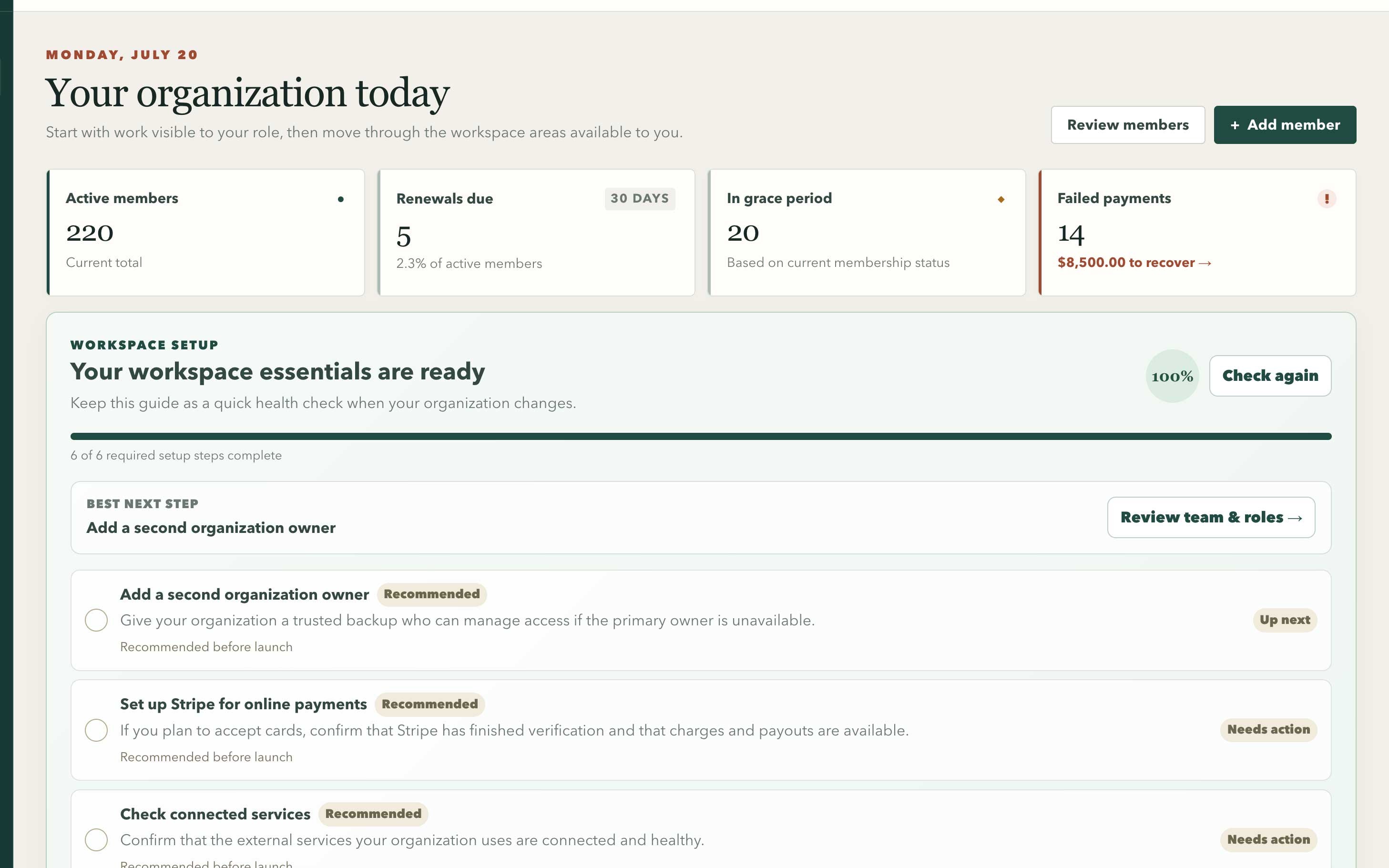
Organization Home brings membership health, priority work, and setup guidance into one operating view.
Swipe or use arrow keys to inspect the full view- The setup guide shows completed essentials, remaining setup, and the best next step. Recommended connections appear only when the organization uses those features.
- Choose My work for the focus suggested by your role, All work for every attention category available to you, a Membership, Finance, Publishing, or Connected services focus when that work applies, or Custom to choose categories yourself. The saved Home view is personal and changes presentation only, never permissions.
- Use Show workspace setup on Home to keep or hide the setup guide after the essentials are complete.
- Choose Search or jump to, or press Command-K on macOS or Control-K on Windows, to find available actions, workspace areas, plain-language definitions, and permitted organization records.
- Workspace records can include member profiles, payments, membership options, publications, publication issues, and connected services. Choosing a result opens its permitted detail when one is available, or the related role-safe workflow, rather than just the top of a workspace area.
- Search results never reveal an area or record that the current role cannot access. If a role or feature changes, the navigation, Home choices, and search scope refresh with it.
- Search for unfamiliar language such as membership option, membership period, payment issue, or automation issue to open a short explanation and the related workspace area.
Follow the normal operating loop
Most day-to-day work follows the same sequence, regardless of whether a member pays online or staff records an offline transaction.
- Open Members and create or locate the member profile.
- Choose Record payment or membership, then select a paid or complimentary membership.
- Review the resulting membership period and paid-through date.
- Open Benefits & access in the member workspace to confirm what is included, then review delivery preferences in Overview.
- Use Home for the short work queue, Payments for payment issues, and Automation issues for work that could not finish automatically.
Expect access and identity checks
Sensitive contact data, financial actions, exports, publication releases, and connected-service settings require the right administrator role. Some changes also require a recent secure identity check.
- If an area is absent, that feature may not be available to the organization or your role may not include it.
- If a sensitive action is blocked, complete the secure identity check and ask an organization owner to review your role.
- Administrator actions are recorded so the organization can reconstruct what changed and why.
- Change history shows a safe summary and record reference; it never returns personal before-and-after values or credentials.
Technical details: record-name crosswalk
The workspace uses plain labels. Database records, APIs, and older support notes may use these formal names.
- A member profile (stored as a member record).
- A membership option (stored as a membership plan).
- A membership period (stored as a membership term).
- Included benefits and access (stored as entitlements).
- A one-member override that includes or blocks access may be stored as an entitlement grant or deny rule.
- A payment issue may be called a reconciliation exception.
- Payment history may be called a ledger, and the broader process of comparing provider records with MembershipPortal may be called reconciliation.
- A safe retry may use idempotency or an idempotency key so the same request cannot create the result twice.
- A secure identity check uses multi-factor authentication at AAL2.